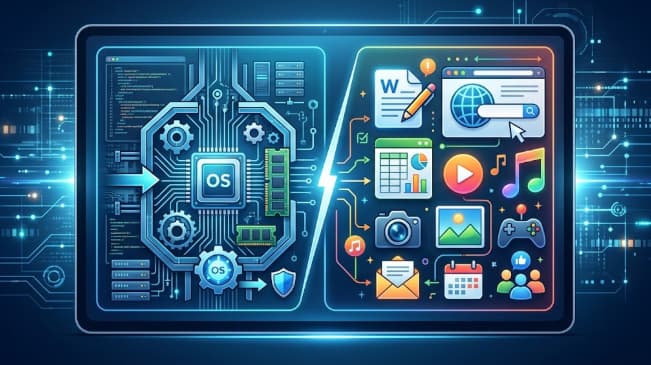
The two main categories of computer software are system software and application software. System software manages the computer’s hardware and provides the environment in which other programs run. Application software sits on top of that environment and performs specific tasks for the person using the machine.
Every program on every device you own falls into one of these two groups. The operating system booting your laptop is system software. The browser you opened it in is application software. The driver that lets your printer receive a job is system software; the document you sent it is the output of application software.
The distinction sounds academic, but it has real consequences for any business that buys, maintains, or secures technology. It determines which software you can replace and which you are locked into, where your security exposure actually sits, how licensing costs accumulate, and whether a problem is worth fixing internally or needs a vendor. This guide explains both categories in detail, shows how they interact, and covers why the line between them matters operationally.
Software and Hardware: The Underlying Relationship
Before separating the two categories, it helps to be precise about what software is.
Hardware is the physical machinery: the processor, memory, storage drives, keyboard, display, network card. These components can execute instructions but cannot decide what instructions to execute. Left alone, hardware does nothing.
Software is the set of instructions that tells hardware what to do. It has no physical form — it is code stored on a drive, loaded into memory, and executed by the processor. The same physical laptop can be a design workstation, a point-of-sale terminal, or a web server depending entirely on what software is installed.
This is why software categories are defined by who the software serves rather than by what it looks like. System software serves the machine. Application software serves the user.
Category One: System Software
System software is any program whose primary job is to manage hardware, manage other programs, or provide the platform on which other programs operate. Users rarely interact with most of it directly, and that invisibility is intentional — system software working correctly is system software you never notice.
It breaks into several distinct types.
The Operating System
The operating system is the most significant piece of system software on any device and the first thing installed. It is the layer between hardware and everything else, and it handles five core responsibilities:
- Process management. Deciding which programs get processor time, in what order, and for how long. This is what allows a machine to run a browser, an email client, and a backup process simultaneously on a limited number of processor cores.
- Memory management. Allocating RAM to programs that request it, reclaiming it when they close, and preventing one program from reading or corrupting another’s memory space.
- File system management. Organizing data on storage devices into files and directories, tracking where everything physically sits, and controlling read and write access.
- Device management. Coordinating input and output across keyboards, displays, printers, network adapters, and storage.
- Security and access control. Enforcing user accounts, permissions, and authentication so that not every program and person can reach every resource.
Common examples include Microsoft Windows, macOS, Linux distributions such as Ubuntu and Red Hat Enterprise Linux, and the mobile operating systems iOS and Android. Servers frequently run Linux or Windows Server, which are built for a different workload profile than desktop systems.
Device Drivers
A driver is a small program that translates between the operating system and a specific piece of hardware. The operating system knows how to issue a generic instruction like “print this page.” It does not know the particular electronic signals a specific printer model expects. The driver performs that translation.
Drivers are the reason a new peripheral often requires a download before it works, and they are a common source of failure. When a printer, scanner, graphics card, or webcam stops working after a system update, an outdated or incompatible driver is a frequent cause. Outdated drivers are also a legitimate security concern, since they run with elevated privileges and are periodically found to contain exploitable flaws.
Utility Programs
Utilities are system software that maintain, analyze, optimize, or protect the computer rather than performing user tasks. The category includes:
- Antivirus and endpoint protection software
- Disk cleanup, defragmentation, and storage management tools
- Backup and recovery software
- File compression tools
- System monitoring and diagnostic utilities
- Firewall software
Utilities occupy a genuine grey area. Antivirus software has a user interface and gets deliberately opened and configured, which makes it feel like an application. It is classified as system software because its function is maintaining the health of the machine rather than producing work for the user.
Programming and Translation Tools
Software developers write code in human-readable languages. Processors execute machine code. Several types of system software bridge that gap:
- Compilers translate entire source code files into machine code before the program runs
- Interpreters translate and execute code line by line as the program runs
- Assemblers convert assembly language into machine code
- Linkers and loaders combine compiled code components and load the finished program into memory for execution
These tools are invisible to most users but are the foundation on which all other software is built.
Firmware
Firmware is software written directly onto a hardware component, controlling that component at the lowest level. The BIOS or UEFI that starts your computer before the operating system loads is firmware. So is the software running inside a router, a solid-state drive, or an industrial sensor.
Firmware is sometimes treated as a third category because it sits so close to the hardware, but it is most commonly classified as a specialized form of system software. From a business perspective it deserves specific attention, because firmware updates are frequently neglected and firmware vulnerabilities sit beneath the operating system where most security tooling cannot see them.
Category Two: Application Software
Application software is any program installed to let a person accomplish a specific task. Where system software serves the machine, application software serves the human — and this is the software people actually think about when they think about software.
It divides usefully into two subgroups.
General-Purpose Application Software
General-purpose applications handle broad tasks that apply across nearly every industry:
- Word processing. Microsoft Word, Google Docs, LibreOffice Writer — creating, editing, and formatting text documents.
- Spreadsheets. Microsoft Excel, Google Sheets — storing, calculating, and analyzing tabular data.
- Presentation software. Microsoft PowerPoint, Keynote, Google Slides.
- Database software. Microsoft Access, MySQL, PostgreSQL — structured storage and retrieval at scale.
- Web browsers. Chrome, Firefox, Safari, Edge.
- Communication tools. Outlook, Slack, Microsoft Teams, Zoom.
- Multimedia software. Photoshop, Premiere, Audacity, VLC.
These are commodity purchases. Any business can buy the same tools as any other, which means they provide no competitive differentiation — only a baseline capability.
Special-Purpose and Custom Application Software
Special-purpose applications are built for a specific industry, function, or organization. Examples include:
- Practice management systems for medical and dental offices
- Case management platforms for law firms
- Point-of-sale systems for retail and hospitality
- Payroll and human resources platforms
- Construction estimating and project management software
- Warehouse and inventory management systems
- Custom applications built for one organization’s particular workflow
The distinction between off-the-shelf special-purpose software and genuinely custom software matters commercially. Off-the-shelf industry software is cheaper and faster to deploy but forces the business to adapt its processes to the software’s assumptions. Custom software adapts to the business instead, which is the right choice when a process is a genuine competitive advantage or when no available product fits the workflow — but it carries higher upfront cost and ongoing maintenance responsibility.
Web and Cloud Applications
Modern application software increasingly runs in a browser rather than being installed locally. Salesforce, QuickBooks Online, Google Workspace, and thousands of other platforms are application software delivered as a service.
The category has not changed — these are still applications performing user tasks. What changed is where the software executes and who maintains it. The vendor handles updates, patching, and infrastructure, which reduces internal maintenance burden but introduces dependencies on connectivity and on the vendor’s own security practices.
System Software vs. Application Software: Direct Comparison
| Characteristic | System Software | Application Software |
| Primary purpose | Manages hardware and provides a platform | Performs specific tasks for the user |
| Who it serves | The computer | The person using it |
| When it runs | Starts with the machine, runs continuously | Launched by the user as needed |
| User interaction | Minimal and indirect | Direct and constant |
| Installation | Required for the machine to function | Optional, installed as needed |
| Dependency direction | Runs independently of applications | Cannot run without system software |
| Typical complexity | Low-level, hardware-specific | Higher-level, task-specific |
| Examples | Windows, Linux, device drivers, BIOS, antivirus | Word, Chrome, Photoshop, QuickBooks |
| Replaceability | Difficult; changing it affects everything above | Straightforward; swap one tool for another |
That last row carries the most practical weight. Replacing a spreadsheet application is an afternoon of retraining. Replacing an operating system across an organization is a project measured in months, because every application, driver, and integration sitting above it has to be validated.
How the Two Categories Work Together
The relationship is best understood by tracing a single action through the stack. Consider clicking “Print” in a word processor:
- The application software — the word processor — formats the document and generates a print request. It does not know what printer exists or how to communicate with it.
- It passes that request to the operating system, using a standard interface the OS provides for exactly this purpose.
- The operating system identifies the target printer, queues the job alongside any other pending jobs, and allocates the memory needed to process it.
- The relevant device driver translates the generic print instruction into the specific commands and data format that particular printer model understands.
- The operating system’s device management sends that data through the correct port or network connection.
- Firmware inside the printer receives the data and controls the physical mechanisms that put ink on paper.
The application never touches the hardware. This layering is deliberate: it means the word processor’s developers do not need to write code for every printer ever manufactured, and it means a new printer can be added to a system without modifying any application.
It also explains where problems originate. If one application cannot print but others can, the issue is in that application. If nothing can print, the issue is in the driver, the operating system, or the hardware. Understanding the layers turns troubleshooting from guesswork into a process of elimination.
Where Middleware Fits
Some software resists clean classification. Middleware — database connectors, message queues, API gateways, application servers — sits between the operating system and applications, providing shared services that multiple applications draw on.
Middleware is usually treated as a subcategory of system software, since it serves other programs rather than end users. In practice, the classification argument matters less than recognizing that the layer exists, because middleware failures produce symptoms that look like application failures and get diagnosed in the wrong place.
Why This Distinction Matters for Businesses
For a business making technology decisions, the two categories carry different risk and cost profiles.
Security exposure differs by layer. A compromised application typically exposes that application’s data. A compromised operating system or driver exposes everything on the machine, because system software runs with higher privileges. This is why operating system patching and driver updates should be prioritized above application updates when resources are constrained.
Licensing costs behave differently. System software is usually a per-device cost that scales with headcount. Application software increasingly follows per-user subscription models that can compound quickly across a growing team. Auditing both separately usually reveals redundant application spending that a combined view obscures.
Switching costs are asymmetric. Application software is comparatively easy to change. System software is not. A business standardizing on an operating system today is making a decision that constrains its options for years, which is worth deliberating properly rather than defaulting to whatever the last hardware purchase came with.
The build-versus-buy decision only applies to applications. Nobody builds a custom operating system. But the question of whether to buy off-the-shelf application software or commission something purpose-built is a genuine strategic choice, and it turns on whether the process being supported is standard or is itself a source of advantage.
Common Misconceptions
“Antivirus is an application because I open it.” Having a visible interface does not determine category. Function does. Antivirus maintains the machine’s health, which places it in system software regardless of how you interact with it.
“Cloud software is a separate category.” It is application software delivered differently. The delivery model changed; the function did not.
“Firmware is hardware.” Firmware is software stored on a hardware component. It can be updated and it can contain bugs, which is precisely why it needs to be treated as software in a maintenance schedule.
“Only two categories exist, and every program fits neatly.” Two categories is the standard and useful framework, but real software sometimes straddles the boundary. Middleware, embedded systems, and virtualization software all sit awkwardly. The framework is a tool for reasoning, not a rigid taxonomy.
Understanding Your Software Stack
System software and application software divide cleanly on function: one manages the machine, the other serves the user. Everything above the hardware falls somewhere on that spectrum, and the layer a program occupies tells you a great deal about its security implications, its replaceability, and its cost profile.
For most businesses, the practical takeaway is that these two layers should be managed differently. System software demands disciplined patching and careful, infrequent change. Application software demands regular review for redundancy, fit, and whether an off-the-shelf tool is genuinely serving a process or quietly distorting it.
Trometech works with Colorado businesses on both layers — managing and securing the system software estate, and building custom application software for organizations whose workflows have outgrown what off-the-shelf products can support.
Frequently Asked Questions
What are the two main categories of computer software?
System software and application software. System software manages hardware and provides the platform other programs run on. Application software performs specific tasks for the user.
Is an operating system system software or application software?
System software. It is the most important example of the category, managing processes, memory, files, devices, and security so that applications have an environment to run in.
Can a computer run without application software?
Yes. A machine with only an operating system will boot and function, though it will do very little of practical use. It cannot run without system software.
Is firmware a third category of software?
Firmware is usually classified as specialized system software rather than a separate category, though some frameworks list it separately because it sits directly on hardware components.
What is the difference between general-purpose and special-purpose application software?
General-purpose applications handle broad tasks across any industry, such as word processing or spreadsheets. Special-purpose applications are built for a specific industry or function, such as medical practice management or construction estimating.
Are web-based tools like Google Docs application software?
Yes. They perform user tasks and are therefore application software. The difference is that they run on a remote server and are accessed through a browser rather than being installed locally.
Are web-based tools like Google Docs application software?
Yes. They perform user tasks and are therefore application software. The difference is that they run on a remote server and are accessed through a browser rather than being installed locally.