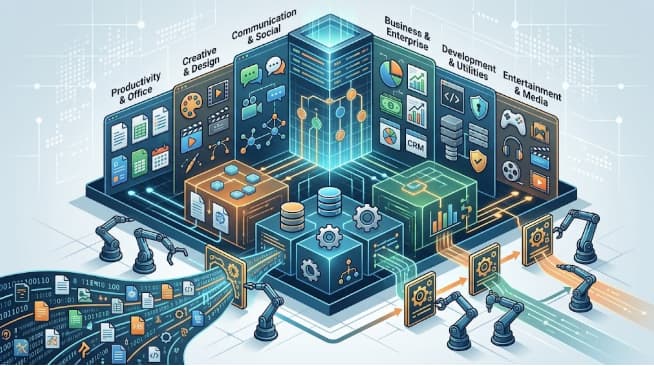
Ask five people in a technology organization how software should be classified and you will get five different answers, all of them correct. A developer will describe functional and non-functional requirements. A procurement officer will reach for UNSPSC codes. A security lead will talk about software bills of materials. A CFO will want it grouped by license model and cost center. A computer science textbook will say system, application, and utility.
None of them are wrong. They are using different classification standards, built for different purposes, and the confusion this causes is expensive. Companies overpay on licenses they have classified inconsistently, fail audits because their asset inventory does not map to any recognized taxonomy, and discover vulnerabilities late because nobody could produce a reliable list of what components are actually running.
This guide covers the classification systems that matter in practice: what each one is for, which are formal standards and which are conventions, and how to apply them to a real software estate.
Why There Is No Single Software Classification Standard
Software resists a single taxonomy because the useful way to group it depends entirely on the question being asked.
A browser is application software by function, a platform by architecture, a free product by license, and a security-critical component by risk profile. All four classifications are simultaneously true and useful in different contexts. Any system that tried to place it in exactly one bucket would be less useful, not more.
The practical consequence is that organizations need several classification layers running in parallel, each serving a defined operational purpose. Attempting to force one scheme to answer every question is the most common failure in software asset management.
| Classification System | Governing Standard | Primary Purpose |
| Functional | Convention, not standardized | Conceptual understanding, architecture |
| Quality characteristics | ISO/IEC 25010:2023 | Specification, evaluation, contracts |
| Requirements | Convention (FR/NFR), informed by ISO/IEC 25010 | Development planning, QA |
| Commercial and procurement | UNSPSC, NAICS, CPV | Purchasing, market classification, tax |
| Licensing | SPDX (ISO/IEC 5962:2021) | Compliance, legal risk |
| Asset identification | ISO/IEC 19770 series | Asset management, audit defense |
1. Functional Classification: The Foundational Model
The most widely taught scheme divides software by its role in the system:
System software manages hardware and provides the environment other programs run in — operating systems, device drivers, firmware, and the BIOS or UEFI layer.
Application software performs tasks for the user: accounting packages, browsers, CRM platforms, media players.
Utility software maintains and optimizes the system — backup tools, antivirus, disk management, compression.
Programming software is used to build other software: compilers, interpreters, debuggers, IDEs, version control.
This model is genuinely useful for reasoning about architecture and dependency, and it remains the standard introduction to the subject. But it is a convention rather than a formal standard, and it has been eroding for two decades. A browser is an application that also functions as a runtime platform. A container orchestrator sits somewhere between system and utility software. SaaS platforms occupy no clear position at all, since the software runs on infrastructure the customer does not own. Hybrid and cloud-native products routinely span three of the four categories.
Treat this scheme as a conceptual foundation, not an operational inventory system.
2. Quality Characteristic Standards: ISO/IEC 25010
Where the functional model is convention, ISO/IEC 25010 is a genuine international standard — part of the SQuaRE (Systems and Software Quality Requirements and Evaluation) family, and the successor to ISO/IEC 9126.
It classifies software not by what it does but by the quality properties it exhibits. The 2023 revision defines nine top-level characteristics, each with sub-characteristics:
| Characteristic | What It Covers |
| Functional suitability | Whether the software does the right things, correctly and completely |
| Performance efficiency | Time behavior, resource use, capacity under load |
| Compatibility | Co-existence with other systems, interoperability |
| Interaction capability | Usability, learnability, accessibility, user error protection |
| Reliability | Availability, fault tolerance, recoverability, maturity |
| Security | Confidentiality, integrity, authenticity, non-repudiation, accountability |
| Maintainability | Modularity, reusability, analysability, modifiability, testability |
| Flexibility | Adaptability, scalability, installability, replaceability |
| Safety | Operational constraint, risk identification, fail-safe behavior, hazard warning |
An important detail most published summaries get wrong: the 2011 version defined eight characteristics, and the 2023 revision expanded this to nine by adding safety as a top-level concern, while restructuring usability into interaction capability and portability into flexibility. A significant amount of online material still describes the 2011 model as current. If you are writing acceptance criteria or an RFP against this standard, check which version you are citing.
This matters commercially because ISO/IEC 25010 gives buyers and vendors a shared vocabulary for what “quality” means in a contract. “The system must be fast” is unenforceable. “The system must meet defined performance efficiency thresholds under specified load” is a testable clause, and the standard supplies the structure for writing it.
3. Requirements Classification: Functional vs. Non-Functional
Before software can be built, its requirements need classifying. The primary split is between functional requirements, which define what the system must do, and non-functional requirements, which define quality attributes — security, performance, portability, maintainability, and the rest.
This is the classification that most directly affects project outcomes, and it is also the one most reliably done badly. Functional requirements are concrete, easy to write, and easy for stakeholders to articulate. Non-functional requirements are abstract, cross-cutting, and frequently absent from specification documents entirely — which is precisely why so many projects deliver software that does everything asked of it and still fails in production.
Research into automated requirements classification illustrates the scale of the imbalance well. A 2025 study in Engineering, Technology & Applied Science Research analyzed a standard dataset of 1,534 labeled requirements across twelve categories and found extreme skew: functionality accounted for 557 entries while portability accounted for two, a ratio of roughly 278 to 1. When the researchers trained a BERT-based classifier on this data, the model failed entirely on the four smallest categories — maintainability, legal, fault tolerance, and portability — scoring zero on each. Only after the authors generated synthetic examples for the underrepresented classes did the model recognize them at all.
The machine learning result is a symptom of a human one. Rare requirement categories are rare in the documentation because teams do not think to write them down. Legal and regulatory constraints, fault tolerance behavior, and portability expectations get raised late, after architecture decisions have foreclosed the cheap solutions.
The practical remedy is to work through a fixed checklist. Walking the ISO/IEC 25010 characteristics one at a time during requirements gathering and forcing an explicit answer for each — even if the answer is “not applicable to this project” — surfaces the categories that would otherwise be silently omitted.
4. Commercial and Procurement Taxonomies
Once software is being bought and sold rather than built, an entirely different set of classification standards applies.
UNSPSC (United Nations Standard Products and Services Code) is the dominant global taxonomy for procurement classification. Software sits under Segment 43, Information Technology Broadcasting and Telecommunications, with a hierarchical code structure descending to specific product families. Large enterprises and public sector buyers use it to categorize spend consistently across vendors and regions.
NAICS (North American Industry Classification System) classifies the businesses producing software rather than the software itself, which is a distinction that trips people up regularly. Under the 2022 revision, software publishers fall under code 513210 — renumbered from the previous 511210. Custom software development services are classified separately under 541511, Custom Computer Programming Services. If you are registering for government contracting, that difference determines which opportunities you are eligible for.
CPV (Common Procurement Vocabulary) serves the equivalent function in European public procurement, with software packages and information systems under the 48000000 range.
eCl@ss is used primarily in European industrial and manufacturing supply chains.
For most businesses these codes matter in three situations: bidding on public sector contracts, filing taxes and business registrations, and normalizing procurement spend across a large vendor base. Outside those contexts they can be safely ignored.
5. Licensing and Deployment Classification
This layer carries the most direct financial and legal risk.
By license model, software divides into proprietary or commercial, open source, freeware, shareware, and public domain. Within open source the meaningful subdivision is between permissive licenses such as MIT, Apache 2.0, and BSD, and copyleft licenses such as GPL and AGPL, which impose obligations on derivative works. Shipping AGPL-licensed code inside a commercial product without understanding those obligations is a genuinely serious legal exposure, and it happens through inherited dependencies rather than deliberate decisions.
SPDX (Software Package Data Exchange) provides the standardized identifier list for licenses and was published as ISO/IEC 5962:2021. SPDX identifiers are what allow automated tooling to determine license obligations across a dependency tree without a lawyer reading every file.
By deployment model, the useful categories are on-premises, cloud-hosted, hybrid, and the service tiers — SaaS, PaaS, and IaaS. This classification drives cost structure, security responsibility boundaries, and data residency obligations, all of which are questions that arrive during compliance reviews.
ISO/IEC 19770 is the standard governing IT asset management. Part 1 defines the process framework; part 2 specifies SWID tags, a machine-readable format allowing installed software to identify itself reliably to discovery tools; part 3 covers entitlement schemas. Organizations that have implemented SWID tagging can produce an accurate installed-software inventory on demand, which is the single most valuable thing to have when a vendor audit arrives.
Why Classification Matters Operationally
Classification sounds like documentation housekeeping until one of these situations arrives:
License audits. Major vendors audit customers routinely. A company that cannot produce a defensible inventory mapped to entitlements negotiates from a position of no leverage, and the resulting settlements are frequently six figures.
Vulnerability response. When a critical flaw is disclosed in a widely used library, the first question is which of your systems contain it. Organizations with component-level classification and a maintained software bill of materials answer in hours. Organizations without one answer in weeks, if at all.
Spend control and shadow IT. Departments buy SaaS on credit cards. Without a classification scheme applied to that spend, duplicate tools accumulate across teams and renew silently.
Security posture. Classifying software by risk tier — internet-facing, handling regulated data, privileged access — determines where patching effort and monitoring should concentrate. Treating all software as equally important means treating none of it as important.
Procurement and contracting. Consistent categorization is what makes vendor consolidation and volume negotiation possible.
How to Classify Your Software Estate
Discover first. You cannot classify what you have not found. Automated discovery across endpoints, servers, and cloud accounts is the starting point. Expect the initial inventory to be 30 to 50 percent larger than what anyone in the organization estimated.
Normalize names. The same product appears in raw discovery data under a dozen variants across versions, editions, and vendor renames. Normalization against a reference catalog is the tedious step, and skipping it invalidates everything downstream.
Apply multiple layers deliberately. Assign each entry a functional category, a license model, a deployment model, a business owner, and a risk tier. Five short fields answer most operational questions.
Reconcile against entitlements. Match installed instances to what you have actually purchased. The gaps in both directions — unlicensed installations and paid-for licenses nobody uses — are usually where the money is.
Set a review cadence. Quarterly for most organizations. A classification scheme that is not maintained becomes actively misleading within about a year, which is worse than having none, because people trust it.
Where Classification Breaks Down
Be realistic about the limits. Modern software resists clean categorization in several ways: hybrid products combine system and application behavior; microservices architectures make “an application” an ambiguous unit; SaaS blurs the line between software and service; AI tools embedded inside other products often escape inventory entirely; and container images bundle dozens of separately licensed components under one apparent asset.
The response is not a more elaborate taxonomy. It is accepting that classification is a decision-support tool with a defined purpose, applying the layers that answer questions you actually have, and documenting the edge cases rather than pretending they resolve cleanly.
Getting the Foundation Right
Software classification is one of those disciplines that produces no visible benefit until the moment it produces a very large one — during an audit, a breach response, or a contract negotiation. The organizations that handle those moments well are the ones that built a classification layer before they needed it.
Trometech works with Colorado businesses on IT asset management, software development, and security infrastructure. If your organization has grown past the point where anyone can name every system in use, building a proper classification and inventory foundation is where the work starts.
Frequently Asked Questions
Is there one official software classification standard?
No. Different standards serve different purposes: ISO/IEC 25010 for quality characteristics, UNSPSC and CPV for procurement, SPDX for licensing, and ISO/IEC 19770 for asset management. Most organizations need several running in parallel.
What are the four main types of software?
System, application, utility, and programming software. This is the standard conceptual model, though it is a convention rather than a formal standard and handles cloud and hybrid products poorly.
What is the difference between functional and non-functional requirements?
Functional requirements define what a system does. Non-functional requirements define quality attributes such as performance, security, and maintainability. Non-functional requirements are more often omitted from specifications, and their absence causes disproportionate problems later.
Which NAICS code applies to software?
513210 covers software publishers under the 2022 revision, replacing the former 511210. Custom software development services fall under 541511 instead.
How many quality characteristics does ISO/IEC 25010 define?
The 2023 revision defines nine: functional suitability, performance efficiency, compatibility, interaction capability, reliability, security, maintainability, flexibility, and safety. The earlier 2011 version defined eight, and a great deal of published material still cites it as current.
How often should a software inventory be reclassified?
Quarterly for most organizations, with continuous automated discovery running underneath. An unmaintained inventory becomes misleading within roughly a year.